August 28, 2026 · 13 min read
How to Rebuild a Website Without Destroying Organic Search Visibility
A redesign is not automatically an SEO problem. Uncontrolled changes to URLs, content, internal links, rendering, and indexation are.
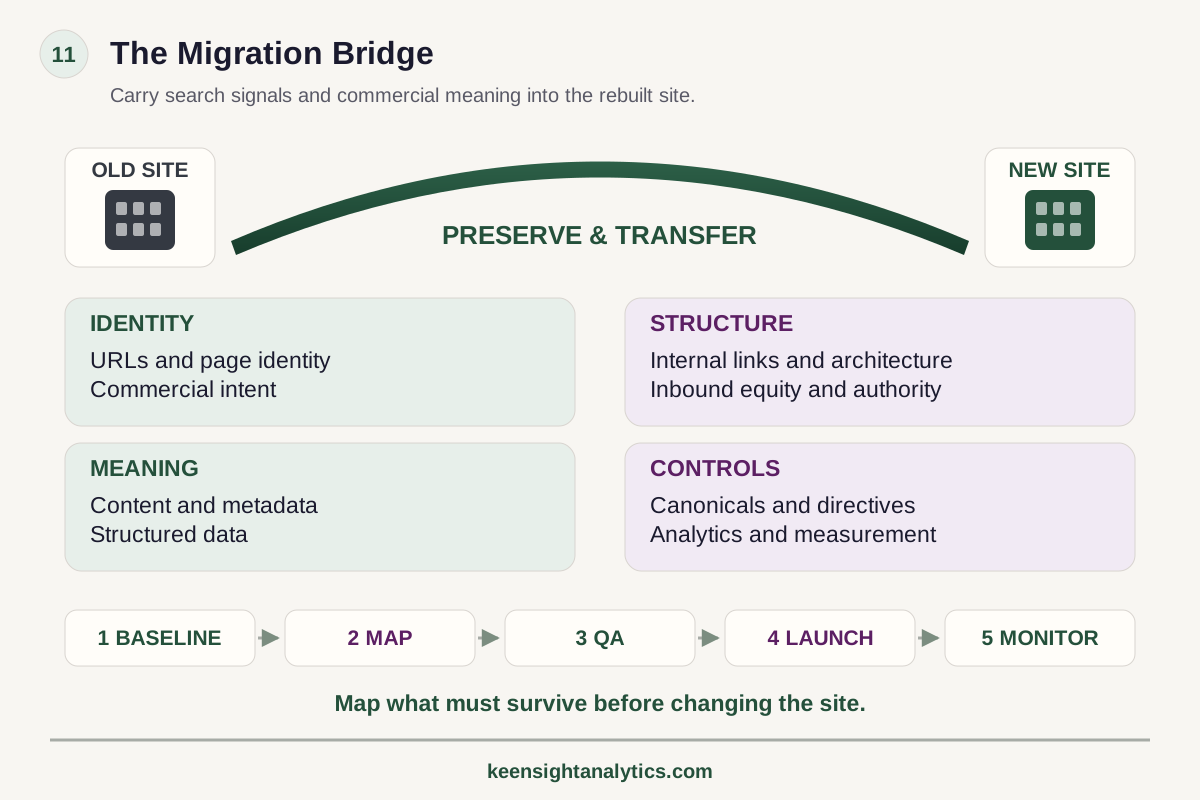
The framework
The migration bridge
Carry search signals and commercial meaning into the rebuilt site.
Identity
URLs, page identity and commercial intent.
Structure
Internal links, architecture, inbound equity and authority.
Meaning
Content, metadata and structured data.
Controls
Canonicals, directives, analytics and measurement.
Release stages
Baseline → map → QA → launch → monitor.
Map what must survive before changing the site.
Technical next step
If the issue is finite and reproducible, it may belong in a fixed technical project rather than an open-ended SEO program.Website redesigns create a dangerous illusion: because the project is framed as design or development, search risk can appear to be a secondary QA item.
In reality, a rebuild can change almost every input search systems use to understand the site at once: URLs, status codes, canonicals, navigation, internal links, content, templates, structured data, rendering, page speed, sitemaps, robots directives, and analytics.
The objective is not to freeze the old site forever. It is to make deliberate changes while preserving the search equity, commercial intent, and measurement history that still matter.
1. Capture a baseline before anyone starts moving pages
Do not wait until staging is complete to ask what the current site ranks for.
Capture the pre-migration state at URL and page-group level. At minimum, record:
- indexable URLs and XML sitemap membership;
- top organic landing pages;
- query visibility and important rankings;
- organic clicks, impressions, and conversions;
- referring domains and important inbound links;
- current canonical targets;
- status codes and redirect chains;
- internal-link counts or major navigation paths;
- structured data on important templates;
- local landing pages and location visibility where relevant.
The baseline is not only for reporting after launch. It tells the migration team which URLs carry disproportionate commercial or search value and therefore deserve special protection.
2. Inventory the old site by page role
A raw URL export is not enough. Classify pages by their function: service, product, category, location, industry, comparison, blog, resource, documentation, utility, campaign, duplicate, obsolete, or other relevant types.
This makes migration decisions more intelligent. A high-value service page should not be treated like an expired campaign. Ten outdated blog posts may deserve consolidation. A legacy URL with strong backlinks may need a carefully chosen redirect even if the content itself is retired.
Page roles also help identify accidental architecture changes. If the old site has 20 indexable commercial pages and the new design has only six generic pages, that is not simply a redesign. It is a substantial search-strategy change.
3. Decide which URLs can remain unchanged
The safest redirect is often no redirect at all.
If a URL is descriptive, stable, and still represents the same page purpose, preserving it reduces migration complexity. Changing URLs for cosmetic consistency alone creates redirect dependencies, recrawl requirements, analytics discontinuity, and unnecessary risk.
When URLs do need to change, document why: taxonomy improvement, platform constraint, consolidation, domain move, internationalization, product restructuring, or another deliberate reason.
4. Build a one-to-one URL map before launch
Google's current site-move guidance still centers on a fundamental process: prepare the new site, map old URLs to their corresponding destinations, then configure redirects.
Every important old URL should have a defined outcome:
- preserve — same URL and substantially same purpose;
- redirect — a clear new equivalent exists;
- consolidate — several old pages now belong in one stronger destination;
- retire — no equivalent exists and returning a genuine 404 or 410 is more accurate than an irrelevant redirect.
Avoid blanket redirects to the homepage. They are poor user experiences and obscure whether a real replacement exists.
5. Preserve intent, not merely word count
Design teams often reduce copy during redesigns. Sometimes that improves the page. Sometimes it removes the information that made the page useful.
Compare old and new pages by job:
- Does the new page answer the same commercial question?
- Does it retain important product, service, location, or eligibility details?
- Are high-performing sections being removed?
- Are FAQs, specifications, comparisons, or evidence disappearing?
- Is the page becoming more generic because several intents were collapsed together?
Do not preserve text simply because it ranks. Preserve useful information and search intent when those are still strategically valid.
6. Protect internal-link equity
A site can retain all its URLs and still damage search performance through navigation changes.
Rebuilds often remove footer links, flatten service menus, move category links behind interactions, orphan old resources, or replace contextual HTML links with interface elements that are less crawlable.
Compare old and new internal-link graphs for priority page groups. Important commercial pages should remain reachable through clear navigation and contextual links. Redirecting old URLs does not replace internal-link maintenance; update internal links to point directly to the new destinations.
7. Review templates, not just sample pages
Migration defects scale through templates.
Test representative examples of every important template: services, products, categories, locations, blogs, resources, pagination, faceted pages, search pages, and any programmatic content.
Check:
- HTTP status behavior;
- titles and meta descriptions;
- canonical tags;
- robots directives;
- structured data;
- rendered main content;
- crawlable links;
- breadcrumbs;
- mobile output;
- pagination and faceting rules;
- alternate-language annotations where relevant.
One correct service page does not prove the service template is correct across all routes.
8. Test the rendered site, not only the browser experience
Modern rebuilds frequently change frameworks or rendering models.
Compare raw HTML, rendered HTML, and visible output for search-critical pages. Confirm that titles, canonicals, robots directives, structured data, main text, and internal links appear reliably.
A page that looks perfect to a logged-in browser can still return an incorrect status, require failed API calls for core content, or expose inconsistent metadata to crawlers.
9. Keep staging out of the index without poisoning production
Staging environments need access controls, but teams often create launch incidents by carrying staging directives into production.
Common failures include:
- sitewide noindex tags remaining after launch;
- robots.txt disallow rules copied to production;
- canonicals pointing to staging hostnames;
- password or authentication rules persisting;
- analytics or consent configuration missing after the environment swap.
Make production directive checks a formal launch gate.
10. Validate redirect behavior technically
A redirect spreadsheet is not proof that redirects work.
Test the deployed server behavior. Important old URLs should resolve to the intended new URL with an appropriate permanent redirect when the move is permanent. Avoid redirect chains and loops. Verify that query parameters, trailing slashes, case variations, and historical path patterns do not create unexpected branches.
For a domain move, test both HTTP and HTTPS variants and common hostname variants. The goal is a clean path from the old canonical URL to the new canonical destination.
11. Rebuild XML sitemaps from the intended index
A sitemap should reflect the pages you want indexed after launch, not every route the CMS can generate.
Remove retired URLs. Add canonical new URLs. Keep noindex pages out. Verify that sitemap locations are accessible and use production URLs. For large sites, preserve logical sitemap segmentation so page groups can be monitored independently.
12. Preserve analytics and conversion measurement
A migration can appear successful in Search Console while destroying business measurement.
Verify analytics tags, consent behavior, form tracking, call tracking, ecommerce events, CRM handoffs, campaign parameters, and referral exclusions. Document any intentional measurement changes so post-launch comparisons do not mix site effects with analytics methodology changes.
If the organization changes analytics platforms during the redesign, treat that as a separate measurement migration with its own baseline and reconciliation plan.
13. Launch with a defined monitoring window
Do not consider the SEO migration finished when DNS changes or the deployment completes.
Monitor priority page groups for:
- crawl errors and unexpected status codes;
- indexation changes;
- canonical changes;
- redirect failures;
- organic landing-page traffic;
- query visibility;
- conversion changes;
- template rendering defects;
- XML sitemap processing;
- important backlink destinations.
Assign an owner who can distinguish expected volatility from a defect that requires remediation.
14. Diagnose losses by page group
If visibility declines, sitewide averages are too coarse.
Ask which template or page group lost performance. Did all migrated service URLs decline? Only pages with changed content? Only pages moved deeper in the navigation? Only JavaScript-heavy routes? Only one locale?
This segmentation can isolate whether the likely cause is redirects, content, internal links, rendering, canonicals, market change, or measurement noise.
15. Do not stack unnecessary risk
A redesign already changes many variables. Combining a domain move, CMS migration, URL rewrite, navigation overhaul, content rewrite, analytics replacement, and brand repositioning into one launch makes diagnosis difficult.
Sometimes the business requires those changes together. When it does, baseline and QA discipline become even more important. When it does not, sequence major changes so the organization can understand their effects.
16. A practical migration sequence
- Capture the search and conversion baseline.
- Inventory URLs and classify page roles.
- Decide which URLs remain, redirect, consolidate, or retire.
- Map old URLs to new destinations.
- Compare old and new content and internal linking.
- QA every important template in staging.
- Validate production directives, redirects, canonicals, analytics, and sitemaps at launch.
- Monitor page groups and priority URLs after launch.
- Investigate deviations against the baseline rather than reacting to sitewide totals alone.
A successful redesign preserves meaning while changing implementation
Search engines do not care whether the new design won an award. They need stable signals about which URLs exist, what those pages mean, how they relate, and whether old locations have moved.
The best migration work gives the design and development teams room to improve the site while preserving the commercial search system underneath it.
Primary reference
Google's current migration guidance is documented in How to move a site, including preparation, URL mapping, redirects, and post-move expectations.
When this becomes implementation
Use a fixed project for a finite technical failure layer.
A Technical SEO Project fits when the root cause is bounded—such as rendering, canonicalization, indexation, migration, or template defects—and the remediation can be scoped. If the root cause is still uncertain or several failure layers interact, diagnose the system first.Five release gates
Use five gates: baseline (priority URLs and search data captured), mapping (important old URLs have intentional destinations), staging QA (templates, canonicals, directives, links, structured data, and analytics validated), launch (redirects and production controls verified), and recovery (indexation, impressions, traffic, and conversion paths monitored).
Move to the next gate when the current gate passes—not merely because the launch calendar says so.
Use migration risk to choose between diagnosis, a fixed project, and managed Search
A rebuild does not automatically require an open-ended SEO engagement. If the migration plan, URL map, rendering model, redirect rules and acceptance criteria are already known, a Fixed Technical SEO Project is the bounded implementation path. If the risky failure mechanism is still uncertain, use Search Intelligence to establish the technical and competitive baseline before the release plan is locked.
A Free Visibility Preview can establish whether the current site already shows meaningful visibility gaps before deeper work is commissioned. Use managed KeenSight Search only when the rebuild is one part of a recurring program involving technical architecture, commercial pages, content, authority and measurement. The companion analyses on technical-audit prioritization and JavaScript rendering help define the project boundary.
Decision checkpoint
Decide whether the technical issue is bounded before choosing the engagement.
Technical defects can be finite projects, symptoms of a larger system problem, or merely observations that need validation.- 01ReproducibilityCan the failure be reproduced on a defined URL, template, rendering path, canonical rule, or release condition?
- 02ScopeIs the affected set bounded enough to define acceptance criteria and a finite remediation plan?
- 03DependenciesDoes fixing it require ongoing coordination with content, architecture, authority, or measurement beyond the technical layer?
Migration Controls That Matter
Baseline first
Capture URLs, visibility, conversions, links, and technical state before the rebuild changes the evidence.
Map every important URL
Preserve, redirect, consolidate, or retire deliberately instead of relying on blanket rules.
QA templates
Test status codes, canonicals, directives, rendering, links, structured data, and sitemaps across every major page type.
Monitor after launch
Track page groups and priority URLs long enough to separate normal recrawl volatility from real migration defects.
Technical SEO next steps
Use the smallest operating model that can actually solve the failure.
Compare other ways to get help
Benchmark the site before the redesign changes it
A defensible pre-launch baseline makes migration impact measurable. If the technical work is finite, a fixed Technical SEO Project may be the right remediation path.
Keep Reading
Build an SEO Baseline Before a Redesign
Define the pre-change reference point before migration work begins.
Read article →Prioritize Technical SEO Findings
Turn migration audit findings into an impact-based remediation sequence.
Read article →Technical SEO Project vs Managed Search
Choose the operating model that matches a finite defect set or an ongoing search program.
Read explainer →Make it specific
See what the market looks like for your company.
The free visibility preview turns a broad search topic into a limited personalized baseline.