August 28, 2026 · 12 min read
Technical SEO for JavaScript-Heavy Websites: A Practical Audit Process
JavaScript is not the SEO problem. Unreliable discovery, rendering, routing, metadata, and failure states are. Audit the behaviors that affect public search surfaces.
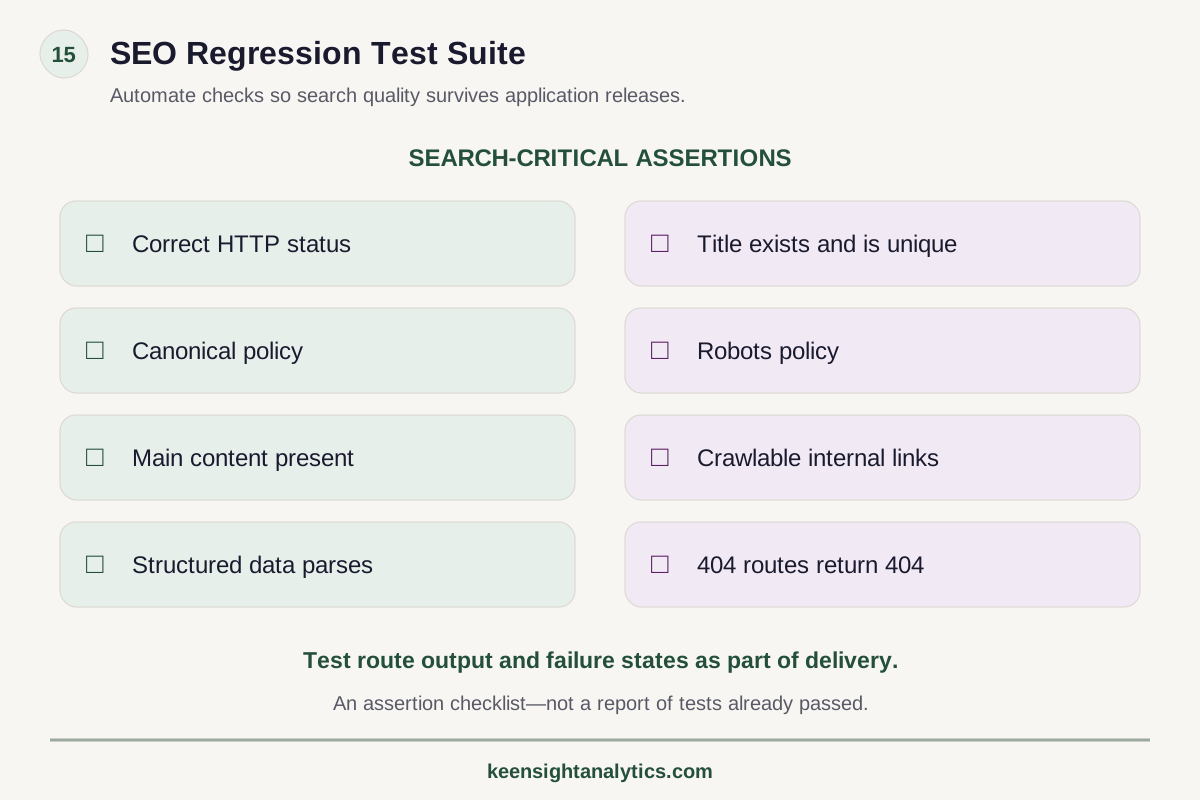
The framework
SEO regression test suite
Search-critical assertions to include in delivery.
Response
Correct HTTP status; missing routes return 404.
Metadata
Title exists and is unique; canonical and robots policies are correct.
Content and links
Main content exists and internal links are crawlable.
Structured data
Schema parses correctly.
Test route output and failure states. This is a checklist, not a report of tests passed.
Technical next step
If the issue is finite and reproducible, it may belong in a fixed technical project rather than an open-ended SEO program.JavaScript is part of the modern web. Treating it as inherently bad for SEO is no more useful than treating every framework as automatically search-friendly.
Google documents a crawl → render → index process for JavaScript pages and says Googlebot runs JavaScript using an evergreen Chromium environment. That capability does not eliminate implementation risk. A search-critical page can still fail because core information is absent from the response, links are not discoverable, routing returns misleading status codes, APIs fail, or metadata changes inconsistently between raw and rendered states.
The goal of JavaScript SEO is not "use less JavaScript." It is predictable, crawlable, indexable output for the information that needs to be found.
1. Classify the rendering model before auditing symptoms
Start by understanding how the application delivers content.
Common patterns include:
- server-side rendering;
- static generation;
- client-side rendering;
- hybrid rendering;
- incremental or on-demand generation;
- app-shell architectures;
- edge rendering.
The same framework can support several of these models. Do not infer the search behavior from the framework name alone.
Identify which page groups use which rendering path, and which data dependencies must succeed for search-critical content to appear.
2. Compare raw HTML, rendered HTML, and visible output
This is the central JavaScript SEO test.
For representative pages, capture:
- the server response HTML;
- the rendered DOM after JavaScript executes;
- the page a normal user sees.
Compare search-critical elements:
- main text;
- title element;
- meta description;
- canonical tag;
- robots directives;
- structured data;
- headings;
- internal links;
- images and alt text where relevant.
Differences are not automatically defects. The question is whether the final rendered state is reliable, consistent, and discoverable.
3. Test whether internal links are actually crawlable links
A navigation element can work for a human and still be weak for crawler discovery.
Google recommends using crawlable <a> elements with meaningful href values. Audit whether menus, cards, pagination, breadcrumbs, filters, and related-content modules expose real links rather than only click handlers or script events.
Pay special attention to:
- SPA navigation;
- infinite-scroll interfaces;
- load-more controls;
- tabs that reveal unique crawlable content;
- faceted filters;
- product grids populated after API calls.
If an important URL can be reached only through user interaction, improve the crawl path.
4. Audit HTTP status behavior independently of the UI
Single-page applications can create search problems when every route returns a 200 response and JavaScript decides what the user sees.
Test real server responses for:
- valid pages;
- nonexistent routes;
- redirected routes;
- authentication-required routes;
- retired content;
- server failures.
A beautiful client-side "not found" screen with a 200 status can become a soft 404. A client-side redirect may not communicate the move as cleanly as an appropriate server redirect.
Meaningful HTTP status codes are part of the search contract.
5. Verify canonical consistency
Canonical tags are particularly sensitive when applications update head elements dynamically.
Check whether the raw and rendered canonical values agree. Confirm that route transitions do not leave the previous page's canonical in the DOM. Test parameterized URLs, filters, pagination, variants, and trailing-slash behavior.
Google's JavaScript SEO guidance recommends setting canonical information consistently and cautions against using JavaScript to change a canonical away from a value already supplied in the original HTML.
6. Test titles and metadata across client-side navigation
SPA route changes can produce stale titles, duplicated metadata, or missing head updates.
Visit pages directly as new requests and through client-side transitions. The state should be correct in both cases.
Automated tests can catch common failures by asserting the expected title, canonical, robots directive, and primary heading for each route type.
7. Inspect API dependencies
Many JavaScript pages depend on APIs for content, pricing, inventory, reviews, navigation, or personalization.
Ask what happens when:
- the API is slow;
- the request times out;
- authentication expires;
- rate limiting occurs;
- the response is empty;
- the API returns an error schema;
- a third-party script is unavailable.
If the core service description or product inventory disappears under common failure states, the issue affects both search resilience and user resilience.
8. Audit hydration and runtime errors
A server-rendered page can deliver useful HTML and then break during hydration.
Look for JavaScript errors that remove content, duplicate components, rewrite metadata incorrectly, break links, or prevent interaction. Test representative devices and network conditions.
Monitor production error rates by template. A rendering issue affecting 1% of traffic can still create a large search-quality problem on a high-volume site.
9. Review robots access to required resources
Google's documentation notes that blocked JavaScript or CSS resources can prevent proper rendering.
Review robots rules, CDN controls, bot protection, WAF rules, and authentication systems. Ensure Googlebot can access the resources necessary to render public indexable pages.
Also inspect whether bot mitigation or rate limiting behaves differently from normal user traffic. A search crawler receiving intermittent 403s or challenge pages creates a technical problem even if employees never see it.
10. Audit lazy loading and infinite content
Lazy loading can improve performance, but search-critical information should not depend on impossible interactions.
For images and content, ensure the application loads material based on observable viewport behavior rather than user actions Google cannot reproduce. For infinite-scroll systems, provide crawlable paginated URLs or another architecture that lets each meaningful item be discovered.
Test whether content appears in rendered HTML without scrolling through hundreds of items manually.
11. Review structured data after rendering
JavaScript can generate JSON-LD, but the markup must remain accurate and match visible content.
Check for duplicate schemas created by server and client rendering, stale product data after route changes, hidden claims not visible on the page, and structured data that fails when an API request is delayed.
Use validation tools and inspect the rendered DOM.
12. Test URL uniqueness and route states
Every indexable piece of content should have a stable URL.
Watch for applications where:
- several distinct views share one URL;
- important state exists only in memory;
- hash fragments are used for content that should be separately indexable;
- query parameters generate uncontrolled duplicate states;
- client routing creates multiple paths to identical content.
The URL model is information architecture, not just front-end implementation.
13. Review performance without confusing it with indexation
Performance matters for users, conversion, and page experience, but not every JavaScript performance warning explains an indexing problem.
Measure Core Web Vitals and application performance, then keep the diagnosis clear. A slow hydration path may correlate with poor experience. A missing canonical is a different failure. Do not let one dashboard collapse all technical issues into "site speed."
14. Prioritize public search surfaces
Not every JavaScript defect deserves SEO attention.
An account dashboard behind authentication has a different search role from a product category, location page, public documentation, or service page.
Classify routes by indexation intent and commercial importance. Focus the audit on pages that need to be discovered and understood through public search.
15. Build automated regression tests for search-critical output
JavaScript applications change frequently. A one-time audit can become stale after the next release.
Add automated checks where practical:
- expected status code;
- nonempty title;
- canonical matches route policy;
- robots directive matches indexation policy;
- primary content exists;
- important internal links contain valid href values;
- structured data parses;
- 404 routes return the correct status.
SEO quality becomes more durable when it is part of the software delivery system instead of a quarterly crawler report.
16. A practical JavaScript SEO audit sequence
- Map rendering models and public route types.
- Compare server response, rendered DOM, and visible page.
- Validate status codes and redirect behavior.
- Test crawlable links and discovery paths.
- Verify titles, canonicals, robots directives, and structured data.
- Inspect API dependencies, hydration, and failure states.
- Review robots, CDN, and bot-access controls.
- Test lazy loading, pagination, and URL uniqueness.
- Prioritize defects by template scope and commercial importance.
- Add regression tests for the search-critical outputs most likely to break again.
JavaScript SEO is systems QA
The strongest JavaScript SEO programs are not built around a fear of rendering. They are built around predictable application behavior.
If search-critical pages return correct statuses, expose stable URLs, render complete content, provide crawlable links, maintain consistent metadata, and degrade safely when dependencies fail, the framework becomes much less important than the output.
Primary reference
Google documents its current JavaScript processing model and recommendations in Understand JavaScript SEO basics and its companion troubleshooting guidance.
When this becomes implementation
Use a fixed project for a finite technical failure layer.
A Technical SEO Project fits when the root cause is bounded—such as rendering, canonicalization, indexation, migration, or template defects—and the remediation can be scoped. If the root cause is still uncertain or several failure layers interact, diagnose the system first.Four JavaScript failures to test
- Empty initial HTML: main content appears only after an API call.
- Interaction-only links: navigation uses click handlers without crawlable anchors.
- Soft 404 routing: a missing product shows an error but returns HTTP 200.
- Client-only redirects: users move correctly while the initial server response remains ambiguous.
Test server response and rendered output separately.
Make the rendering mechanism reproducible before turning it into a project
“JavaScript SEO” is too broad to scope responsibly. Reproduce whether the failure is server output, hydration, client routing, crawlable links, status handling, lazy loading, blocked resources or an API dependency. If that mechanism is known and the affected templates are bounded, move into a Fixed Technical SEO Project. If the mechanism remains ambiguous across templates or search surfaces, use Search Intelligence first.
A Free Visibility Preview can show whether the affected commercial area is also weak in the current market, but it is not a rendering test. Choose managed KeenSight Search only when the JavaScript remediation must move continuously with site architecture, content, internal discovery and measurement. For project triage, use the companion technical prioritization framework.
Decision checkpoint
Decide whether the technical issue is bounded before choosing the engagement.
Technical defects can be finite projects, symptoms of a larger system problem, or merely observations that need validation.- 01ReproducibilityCan the failure be reproduced on a defined URL, template, rendering path, canonical rule, or release condition?
- 02ScopeIs the affected set bounded enough to define acceptance criteria and a finite remediation plan?
- 03DependenciesDoes fixing it require ongoing coordination with content, architecture, authority, or measurement beyond the technical layer?
Audit the Output, Not the Framework Name
Raw vs rendered
Compare the server response, rendered DOM, and visible page for search-critical content and metadata.
Real crawlable links
Navigation, cards, pagination, and related content should expose discoverable URLs through proper links.
Meaningful status codes
Validate 200, redirects, 404s, errors, and authentication states independently from what the SPA displays.
Regression protection
Automate checks for route metadata, content, links, canonicals, directives, and status behavior where possible.
Technical SEO next steps
Use the smallest operating model that can actually solve the failure.
Compare other ways to get help
Find the JavaScript behaviors that actually constrain search
A technical audit should isolate rendering, routing, discovery, metadata, and failure-state defects by commercial impact—not produce a generic framework warning.
Keep Reading
Diagnose an Indexation Drop
Check rendering and route behavior when indexed pages disappear unexpectedly.
Read article →Prioritize Technical Findings
Rank JavaScript defects by scope, confidence, impact, and commercial importance.
Read article →JavaScript Rendering and SEO
Review rendering mechanics in a focused evergreen explainer.
Read explainer →Make it specific
See what the market looks like for your company.
The free visibility preview turns a broad search topic into a limited personalized baseline.