August 28, 2026 · 11 min read
How to Diagnose a Sudden Drop in Indexed Pages
A falling index count can signal a serious defect—or healthy consolidation. Start by identifying which URLs changed and whether commercially important pages were actually lost.
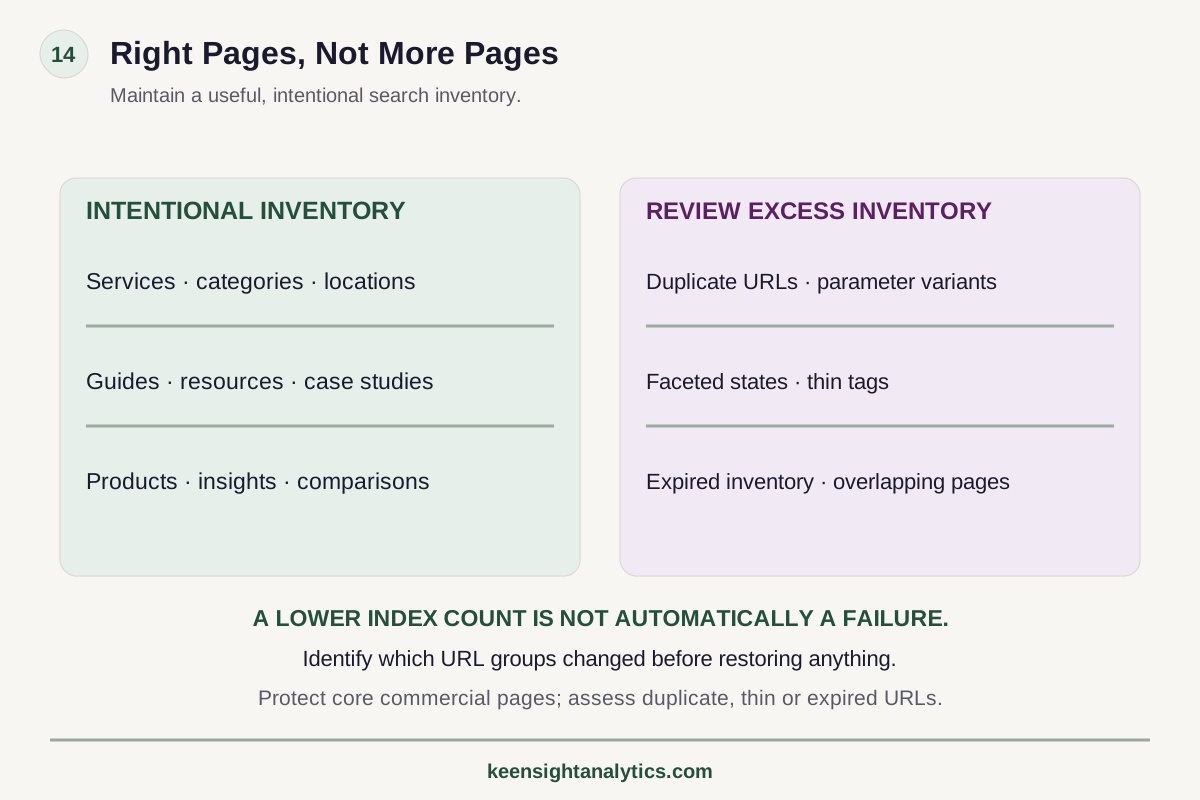
The framework
Right pages, not more pages
Maintain a useful, intentional search inventory.
Intentional inventory
Services, categories, locations, guides, resources, case studies, products, insights and comparisons.
Review excess inventory
Duplicates, parameters, facets, thin tags, expired inventory and overlapping pages.
Identify what changed
Find the affected URL groups before restoring anything.
A lower index count is not automatically a failure.
Technical next step
If the issue is finite and reproducible, it may belong in a fixed technical project rather than an open-ended SEO program.A sudden decline in indexed pages can trigger the wrong kind of urgency.
Teams see a graph fall and immediately assume Google has penalized the site, that crawl budget collapsed, or that every removed URL needs to be restored. But an index count is not a business KPI by itself.
Losing 10,000 faceted or duplicate URLs can be healthy. Losing 40 core service pages is not.
The diagnostic process therefore begins with one question: which URLs changed state?
1. Confirm that the drop is real
Before troubleshooting the site, confirm the observation.
Different tools measure indexation differently. Search Console reports, URL Inspection, sitemap processing, site operators, crawler estimates, and third-party tools should not be expected to produce identical counts.
Check:
- the exact date the decline began;
- whether the data is complete or preliminary;
- whether a reporting interface or methodology changed;
- whether the decline appears in multiple page groups or only one;
- whether organic impressions or landing-page traffic changed at the same time.
A reporting artifact requires a different response from a genuine loss of search eligibility.
2. Segment by URL type immediately
Do not analyze the site as one number.
Split URLs into meaningful groups: services, products, categories, locations, industries, blogs, resources, filters, pagination, parameters, archived content, and any programmatic templates.
Then ask which group lost indexed URLs.
If the loss is concentrated in parameters the site never wanted indexed, the change may be beneficial. If it is concentrated in one new React template or a migrated directory, the failure layer becomes much clearer.
3. Review recent deployments and configuration changes
Indexation problems frequently follow an event the team did not classify as an SEO change.
Review:
- CMS releases;
- theme or template changes;
- domain, protocol, or hostname changes;
- routing updates;
- CDN or firewall changes;
- robots.txt edits;
- SEO plugin updates;
- canonical logic changes;
- pagination or faceting changes;
- JavaScript framework releases;
- content pruning or consolidation;
- sitemap-generation changes.
Build a deployment timeline next to the indexation timeline. Correlation is not proof, but it creates a useful hypothesis set.
4. Check robots.txt and noindex directives
Accidental directives can remove large page groups quickly.
Inspect production robots.txt and page-level meta robots tags. Also check X-Robots-Tag headers where the stack uses them.
Look for:
- sitewide noindex left over from staging;
- template-specific noindex rules;
- robots disallow patterns that changed unexpectedly;
- CDN or application responses injecting headers;
- conditional directives that differ by user agent or environment.
Remember that blocking crawling and requesting noindex are not the same mechanism. Diagnose the actual directive chain rather than treating robots.txt as a universal index-control file.
5. Check status codes and soft failures
Pages intended for indexing should return a meaningful success response and real content.
Audit the affected URLs for 404s, 410s, redirects, server errors, rate limits, authentication responses, and soft 404 behavior.
Modern applications can produce visually acceptable error pages with a 200 status, or client-side redirects that leave the server response ambiguous. Compare the HTTP response, rendered page, and intended business state.
6. Inspect canonicalization
A canonical change can make pages disappear from the index without making them inaccessible.
For affected page groups, compare:
- declared canonical;
- actual URL;
- redirect destination;
- internal-link target;
- sitemap URL;
- Google-selected canonical where available.
Common failures include self-canonicals replaced with category canonicals, canonical templates dropping parameters incorrectly, staging hostnames in canonical tags, and conflicting signals across links, redirects, and sitemaps.
7. Compare raw and rendered HTML
If the affected pages depend on JavaScript, inspect whether Google can receive and render the important content consistently.
Compare raw HTML, rendered HTML, and user-visible output. Confirm that main text, internal links, titles, canonicals, robots directives, and structured data survive the rendering path.
Also test failure states. If an API times out, does the page become an empty shell? Does client-side routing return the wrong status? Are important links only created after interaction?
An indexation decline after a framework migration may be a rendering or status problem rather than a content-quality problem.
8. Review XML sitemap changes
Sitemaps do not force indexation, but they are valuable diagnostic artifacts.
Check whether affected URLs disappeared from the sitemap, whether new noncanonical URLs were introduced, whether sitemap files return correctly, and whether the sitemap now contains redirects, noindex URLs, or stale hostnames.
For large sites, compare sitemap groups independently. A decline isolated to one sitemap can quickly narrow the investigation.
9. Evaluate internal-link changes
Pages can remain technically indexable while becoming much harder to discover or interpret because the internal architecture changed.
Ask whether the affected URLs:
- lost navigation links;
- moved several clicks deeper;
- became orphaned;
- are linked only through site search or filters;
- lost contextual links from strong related pages;
- were replaced in navigation by a different canonical page.
This is especially important after redesigns and taxonomy changes.
10. Ask whether the pages deserve separate indexation
Not every decline is a defect.
Review whether the removed pages are distinct, useful, and intended search destinations. Large sets of near-duplicate filters, thin tags, generated combinations, expired inventory, and overlapping articles can shrink without harming commercial visibility.
If Google is consolidating duplicates toward the same canonical intent the site should have consolidated itself, the appropriate action may be architectural cleanup rather than restoration.
11. Distinguish content decay from technical exclusion
If directives, status codes, canonicals, rendering, sitemaps, and internal links are correct, examine whether the page set has become low-value or redundant.
Questions include:
- Do many pages answer nearly identical intents?
- Has content become outdated?
- Are pages generated from thin data?
- Did a product or location portfolio change?
- Are competitors supplying materially stronger pages for the same need?
Technical fixes cannot create distinct value where the page set itself is unnecessary.
12. Compare indexation loss with search demand
Quantify business impact.
For lost URLs, measure prior impressions, clicks, conversions, backlinks, commercial role, and internal-link value. A large count decline may represent very little demand. A small decline may be commercially severe if the pages were high-value locations or product categories.
This prevents teams from optimizing for the size of the index rather than the quality of indexed inventory.
13. Use samples for very large sites
If millions of URLs are involved, do not inspect them one by one.
Sample by template, status, exclusion reason, sitemap, parameter pattern, commercial role, and traffic history. Look for repeated mechanisms that explain a large share of the change.
Server logs can also help establish whether crawling behavior changed around the affected sections.
14. Prioritize remediation by failure mechanism
Once the cause is identified, fix the system rather than individual symptoms.
If a canonical template is wrong, fix the template. If internal navigation removed an entire section, repair the architecture. If thousands of low-value filters are being consolidated correctly, do not force them back into the index.
Then define how recovery will be verified: status tests, rendered HTML, sitemap validation, URL Inspection samples, renewed impressions, indexation state, and commercial landing-page performance.
15. A rapid diagnostic sequence
- Confirm the timing and reliability of the indexation signal.
- Identify the affected URL groups.
- Overlay deployments and configuration changes.
- Check robots, noindex, headers, status codes, and redirects.
- Inspect canonicalization and sitemap behavior.
- Compare raw and rendered output for JavaScript-dependent pages.
- Review internal-link changes and crawl paths.
- Assess whether the removed pages are unique and commercially useful.
- Quantify lost demand and conversion value.
- Fix the root mechanism and monitor the affected page group.
The question is not “how many pages are indexed?”
The better question is: are the right pages indexed, and did an important page group lose search eligibility or visibility for a reason we can diagnose?
Indexation is inventory management. Healthy sites do not maximize indexed URL count. They maintain a clean, useful, intentional set of search destinations.
When this becomes implementation
Use a fixed project for a finite technical failure layer.
A Technical SEO Project fits when the root cause is bounded—such as rendering, canonicalization, indexation, migration, or template defects—and the remediation can be scoped. If the root cause is still uncertain or several failure layers interact, diagnose the system first.Rapid incident triage
Only low-value URLs disappeared? Review whether healthy consolidation occurred. A specific template disappeared? Check directives, status, canonicals, rendering, and recent releases. URLs remain indexed but impressions collapsed? Shift toward demand, SERP, content, and competition. Multiple systems disagree on counts? Validate the observation before changing production.
Separate incident diagnosis from remediation before choosing the engagement
A sudden indexation decline is often an incident first and a project second. When the release, directive, status-code, canonical or rendering cause is not yet proven, Search Intelligence can support a one-time diagnosis rather than assuming the first plausible explanation is correct. Once the mechanism and affected URL set are reproducible, a Fixed Technical SEO Project can define remediation, QA and verification.
If the question is whether the indexation issue is materially affecting market visibility, the Free Visibility Preview provides a limited external signal; it does not replace incident diagnostics. Use managed KeenSight Search when indexation is only one recurring constraint among content, architecture, authority and competitive work. The JavaScript audit process is especially relevant when raw and rendered behavior diverge.
Decision checkpoint
Decide whether the technical issue is bounded before choosing the engagement.
Technical defects can be finite projects, symptoms of a larger system problem, or merely observations that need validation.- 01ReproducibilityCan the failure be reproduced on a defined URL, template, rendering path, canonical rule, or release condition?
- 02ScopeIs the affected set bounded enough to define acceptance criteria and a finite remediation plan?
- 03DependenciesDoes fixing it require ongoing coordination with content, architecture, authority, or measurement beyond the technical layer?
Diagnose Before Restoring URLs
Segment the loss
Find the page group that changed before treating a sitewide index count as the problem.
Check directives + canonicals
Robots, noindex, headers, redirects, canonicals, and sitemaps can change indexation at template scale.
Inspect rendering
Framework changes can remove search-critical content or status behavior while the browser still looks normal.
Measure commercial impact
A smaller index can be healthy when duplicate or low-value inventory is removed.
Technical SEO next steps
Use the smallest operating model that can actually solve the failure.
Compare other ways to get help
Find the failure mechanism before changing the site
Search Intelligence can separate a technical indexation defect from content consolidation, competitive displacement, or reporting noise before remediation begins.
Keep Reading
Prioritize Technical SEO Findings
Score the root cause by impact, scope, confidence, and commercial importance.
Read article →Technical SEO for JavaScript Sites
Audit rendering, routing, links, status codes, and metadata in JavaScript-heavy applications.
Read article →Search Crawling and Indexing
Review the underlying crawl, render, canonical, and indexation mechanics.
Read explainer →Make it specific
See what the market looks like for your company.
The free visibility preview turns a broad search topic into a limited personalized baseline.